VMFSTOOLS is something I perhaps don’t use as regularly as I’d like
and as a result find myself having to refer to the documentation pretty
much anytime I do anything with it. With that in mind I thought I’d
document some examples of what vmkfstools can do here, so I’ll have something to refer back to.
Simply put, vmkfstools is a vSphere cli tool for managing VMFS volumes. It will allow you to perform operations against both the file system and the virtual disk files. Here I’ll be concentrating on looking at what we can do with virtual disks.


As a result, we end up with 2 files – the virtual disk descriptor file, and the virtual disk itself:
By default this will create a thick disk using a Bus Logic virtual adapter. To create a thin provisioned virtual disk we need to use the diskformat option, vmkfstools -c 5G –diskformat thin testdisk2.vmdk.
Running ls -la can be misleading as it reports the new disks size as being its maximum possible size, in this case 5GB:

But we can confirm the files actual size on disk, and therefore confirm that it is thin provisioned by running du -ah.
This shows the filesize to be zero, which is what we were expecting from an, as yet unused, thin provisioned disk.

To convert, or inflate, the virtual disk file so that it is changed to the eagerzeroedthick format we can use the --inflatedisk option. This action preserves any existing data on the virtual disk. Depending on the size of the disk, this may take some time.

Once complete, running du -ah now shows the file to be using the 5GB that was originally configured as its maximum size:


The thin provisioned clone of the disk reverts to 5GB as this is the size we had previously set to being ‘eager zeroed’:

When deleting virtual disks from the cli it is recommended to use vmkfstools rather than the linux rm command purely because vmkfstools deletes both the virtual disk file and it’s descriptor, without you having to list both files in your rm command.

Again, like with deleting vmdk files, when renaming it is better to use vmkfstools rather than the mv command, as this renames both of the relevant .vmdk files.
There’s quite a bit more to this tool than what’s covered here, including working with RDMs and the VMFS filesystem itself, which I’ll be putting in a future post.
Simply put, vmkfstools is a vSphere cli tool for managing VMFS volumes. It will allow you to perform operations against both the file system and the virtual disk files. Here I’ll be concentrating on looking at what we can do with virtual disks.
VMKFSTOOLS Virtual Disk Options
Running vmkfstools at the cli prompt will display the options available to us: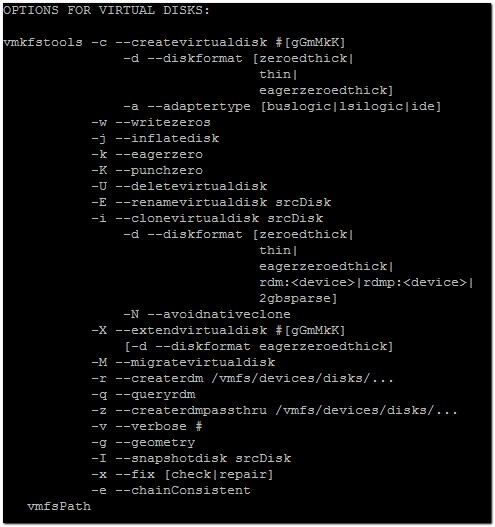
Create a Virtual Disk with vmkfstools
To create a virtual disk we can run vmkfstools -c 2048m testdisk1.vmdk
As a result, we end up with 2 files – the virtual disk descriptor file, and the virtual disk itself:

By default this will create a thick disk using a Bus Logic virtual adapter. To create a thin provisioned virtual disk we need to use the diskformat option, vmkfstools -c 5G –diskformat thin testdisk2.vmdk.
Running ls -la can be misleading as it reports the new disks size as being its maximum possible size, in this case 5GB:

But we can confirm the files actual size on disk, and therefore confirm that it is thin provisioned by running du -ah.
This shows the filesize to be zero, which is what we were expecting from an, as yet unused, thin provisioned disk.

To convert, or inflate, the virtual disk file so that it is changed to the eagerzeroedthick format we can use the --inflatedisk option. This action preserves any existing data on the virtual disk. Depending on the size of the disk, this may take some time.

Once complete, running du -ah now shows the file to be using the 5GB that was originally configured as its maximum size:

Extending a Virtual Disk with vmkfstools
If the 5GB we specified isn’t enough, we can increase the size of the virtual disk by running vmkfstools -X 6GB test.vmdk. We can confirm the change by again running du -ah.
Clone a Virtual Disk with vmkfstools
We can also use vmdkfstools to clone a virtual disk. This is useful if we just need a copy, or in this case if we wish to convert the disk back to being thin provisioned. We can do this by running vmkfstools -i test2.vmdk test2clone.vmdk -d thin
The thin provisioned clone of the disk reverts to 5GB as this is the size we had previously set to being ‘eager zeroed’:

Delete a Virtual Disk using vmkfstools
Now we have the thin provisioned clone, we may want to delete the original virtual disk. This is done by running vmkfstools -U test2.vmdk.When deleting virtual disks from the cli it is recommended to use vmkfstools rather than the linux rm command purely because vmkfstools deletes both the virtual disk file and it’s descriptor, without you having to list both files in your rm command.
Renaming a Virtual Disk using vmkfstools
Finally, and to complete this post, I will rename the cloned vmdk file so that it reflects the original name. We use vmkfstools -E to do this:
Again, like with deleting vmdk files, when renaming it is better to use vmkfstools rather than the mv command, as this renames both of the relevant .vmdk files.
There’s quite a bit more to this tool than what’s covered here, including working with RDMs and the VMFS filesystem itself, which I’ll be putting in a future post.
Comments
Post a Comment