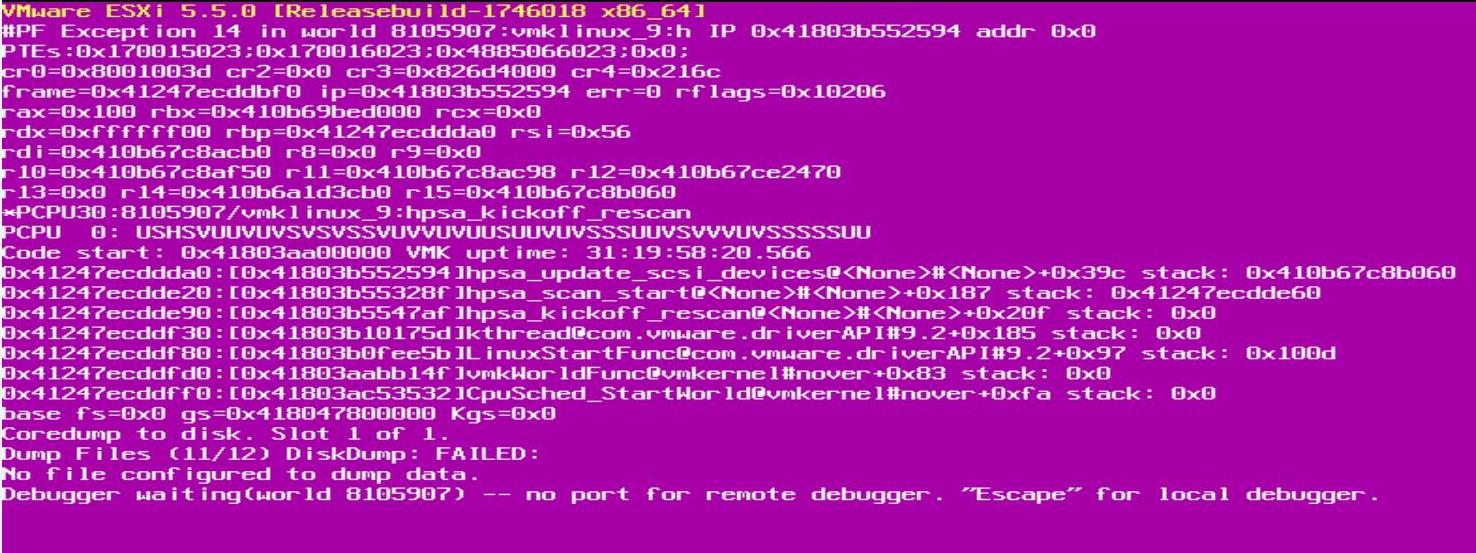
We received lot of Purple Screen of death(PSOD) on ESXi host 5.5.
When analyzed the logs and googled related to the error, It comes to
know that it is a known issue with hpsa (HP ProLiant Smart Array
Controller ) driver affecting ESXi 5.5. It is causing memory leak
associated with device rescans resulting in out of memory conditions and
a potential PSOD. HP has released the latest version of HPSA. HP has
released the latest version of HPSA driver (5.5.0.60-1) for vSphere 5.5.

Below issues were addressed as part of this latest HPSA driver version
~ # vmkload_mod -s hpsa | grep Version
Version: Version 5.5.0.58-1OEM, Build: 1331820, Interface: 9.2 Built on: Dec16 2013
Driver Version: HP HPSA Driver (v 5.5.0.58-1OEM)” meant the affected software driver was used.
1.Place your ESXi host into Maintenance Host
2.Install the hpsa driver VIB using the below following command:
esxcli software vib install -v /tmp/scsi-hpsa-5.5.0.60-1OEM.550.0.0.1331820.x86_64.vib

3.Reboot the ESXi host for the changes to take effect
4.Verify the HPSA driver version after the installation using the below command:
~ # vmkload_mod -s hpsa | grep Version
Version: Version 5.5.0.60-1OEM, Build: 1331820, Interface: 9.2 Built on: May 15 2014
5.Exit your ESXi host from the Maintenance mode
Thats it!!. No more PSOD on your ESXi host. I hope this is informative for you. Thanks for Reading!!! Be Social and share it in social media, if you feel worth sharing it.
Below issues were addressed as part of this latest HPSA driver version
- Fixed a memory leak associated with device rescans resulting in out of memory conditions and a potential PSOD.
- Fixed a null pointer dereference in error handling code that can cause a PSOD in rare cases when device inquiries fail.
- Restore LUN numbering policy to start with 1 instead of 0, avoiding potential issues with Raw Device Maps.
- Enable 64bit DMA mapping instead of default 32bit mapping.
- Improve null pointer checks in device rescanning code, avoiding a potential PSOD.
- Restore maximum outstanding command count, removing artificial limitation that could impact performance.
- Restore support for legacy HP Smart Array P700m controller.
~ # vmkload_mod -s hpsa | grep Version
Version: Version 5.5.0.58-1OEM, Build: 1331820, Interface: 9.2 Built on: Dec16 2013
Driver Version: HP HPSA Driver (v 5.5.0.58-1OEM)” meant the affected software driver was used.
How to Install the latest HPSA driver for ESXi 5.5:
Download the HPSA driver vib file (scsi-hpsa-5.5.0.60-1OEM.550.0.0.1331820.x86_64.vib) for vSphere 5.5 and upload it in your ESXi host datastore1.Place your ESXi host into Maintenance Host
2.Install the hpsa driver VIB using the below following command:
esxcli software vib install -v /tmp/scsi-hpsa-5.5.0.60-1OEM.550.0.0.1331820.x86_64.vib

3.Reboot the ESXi host for the changes to take effect
4.Verify the HPSA driver version after the installation using the below command:
~ # vmkload_mod -s hpsa | grep Version
Version: Version 5.5.0.60-1OEM, Build: 1331820, Interface: 9.2 Built on: May 15 2014
5.Exit your ESXi host from the Maintenance mode
Thats it!!. No more PSOD on your ESXi host. I hope this is informative for you. Thanks for Reading!!! Be Social and share it in social media, if you feel worth sharing it.
Comments
Post a Comment